CAWRA IDE Your AI development team, inside your editor
Tell CAWRA what you want to build: it plans it, builds it and reviews it with you before calling it done. With the AI you choose — Grok, OpenAI, Anthropic, Gemini or models on your own machine — and for free.
From idea to finished code, in four steps
CAWRA goes beyond suggesting lines: it understands your goal, organises the work and hands you a reviewed result. You bring the idea; CAWRA brings the team.
Share your goal
Say it in your own words: a new feature, a fix, an improvement or an idea to explore.
CAWRA plans it
It breaks the goal into clear steps and, if anything is unclear, asks you before it starts.
It builds with you
Several assistants work at once on different parts of your project, without stepping on each other and picking up where they left off.
It checks before delivering
It makes sure everything works and looks right before calling it done. You just give the final OK.
Your plan, in plain sight
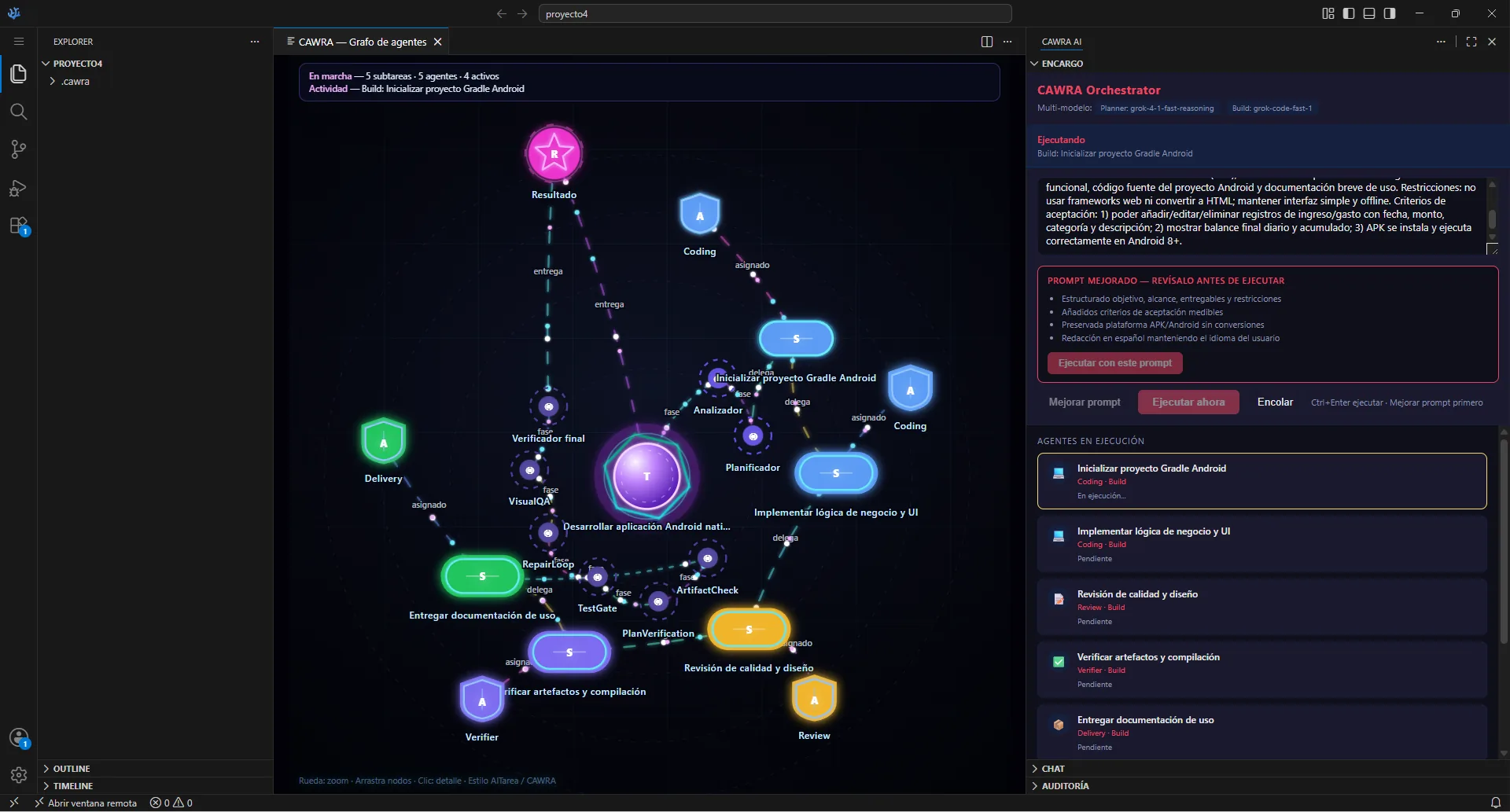
Follow every step on a visual map: what's being done, with which AI and how much is left.
Quality at every step
Clarify, research, build, review and verify: the method of a great team, applied to every task.
Work in parallel
Specialised assistants move forward on different parts of the project at the same time, so you finish sooner.
What's new in CAWRA IDE 1.5
Our biggest update yet: more freedom to choose your AI, more power and more peace of mind.
Choose your AI
Grok, OpenAI, Anthropic, Gemini or local models. Mix them and CAWRA uses the best one for each moment; if one fails, it moves on to the next.
More power
Pick up where you left off, let CAWRA check its own results, and get great results on web, desktop, mobile and server projects.
More peace of mind
AI only touches your project, you approve the changes and you decide how much freedom to give it.
Your keys, kept safe
Your AI credentials are stored securely inside the editor, never in files anyone can read.
Choose your AI. CAWRA uses the best one for each moment.
No lock-in to a single provider. Connect the AIs you like and CAWRA gives each task to the right one: one to think through the plan, another to write the code, another to review the design.
Available AIs
From a single panel you choose your AIs, decide which one handles each task and which steps in if the main one doesn't respond.
Every task, with the ideal AI
Thinks through the plan, analyses your project and checks the logic.
Writes the code and applies changes across every file that needs it.
Suggests code as you type, instantly.
Looks at your screens and checks everything looks the way it should.
Polishes your requests and gathers context before starting.
Answers questions, explains code and keeps you company while you work.
How does CAWRA decide which AI to use?
- Every step of the job has a role: plan, build, review, check the design…
- CAWRA shares the roles out among your AIs and puts them to work at the same time.
- Each AI is tuned to what it does best — no setup needed.
- If an AI doesn't respond, CAWRA carries on with the next one without interrupting you.
- See how much each AI is used at any time, with full transparency.
You decide how far AI goes
More productivity with complete peace of mind: approve every step or let CAWRA move ahead on its own.
Only your project
AI works only inside the folder you have open.
Protected browsing
When it looks things up online, CAWRA blocks access to private networks and sensitive data.
You give the OK
Review every change and approve it before it's applied.
You set the pace
Supervised mode, approving each step, or autopilot with safeguards.
On your computer, on your servers or on GitHub
Work wherever you want. CAWRA IDE adapts to your environment without changing tools.
On your computer
Everything runs on your Windows PC. Ideal for private projects and for working offline with local models.
On your servers
Connect to your servers and CAWRA works on them as if they were on your own machine.
With GitHub
Connect your account and manage repositories and collaboration without leaving the editor.
CAWRA IDE is built on Visual Studio Code, the favourite editor of millions of developers: the same experience, your usual extensions and AI built in from day one.
100% free
CAWRA IDE 1.5 is completely free. Sign up with your name and email and download the Windows installer. No subscriptions, no credit card, no time limits.
- Sign up in a minute: name, email and password
- Instant download of CAWRA IDE 1.5
- Updates included
- Use your own AI account (Grok, OpenAI, Anthropic, Gemini) or local models at no cost
- Plan, build and review with AI
- Automatically picks the best AI
- Chat, assisted editing and autocomplete
- On your PC, your servers and GitHub
- Understands your whole project
CAWRA IDE in action
Real screenshots of CAWRA IDE in action: plans, AI chat, editor and panels.
Free registration
Just your name, email and a password. Confirm your account and download CAWRA IDE 1.5 right away.
Sign in
Sign in with your account to download again.
Verify email
Enter the email you used to register and we will resend the confirmation link.